

Key takeaways
- Start with business tasks and the systems they depend on.
- Set separate targets for tolerable data loss and time to resume work.
- Protect backup copies from the same failures that could affect live data.
- Test whether people can use restored information, then record and fix the gaps.
A business data backup and recovery plan should explain how your team will get useful work back after something goes wrong. Saving copies is part of that plan. You also need to know what those copies contain, how far back they go, who can restore them and what has to work before staff can use the recovered data.
For a Winnipeg business owner or office manager, the starting point is simple: identify the work you cannot afford to lose, then agree on a recovery plan with the people responsible for your IT. Our advice is to work through those decisions before choosing a backup product. We cover cloud files, accounting applications and the checks that make a restore test meaningful.
What is the difference between backup, disaster recovery and business continuity?
A backup preserves a recoverable copy of data. Disaster recovery describes how technology will be restored after a serious disruption. Business continuity covers how the organization keeps essential work moving while recovery happens.
These jobs overlap, but they answer different questions:
Scroll the table to see all columns.
| Part of the plan | Question it answers | Illustrative example |
|---|---|---|
| Backup | What information can we recover? | Recovering an earlier version of a deleted client folder |
| Disaster recovery | How do we restore a usable system? | Rebuilding a failed server, restoring its application and checking access |
| Business continuity | How do we operate during the interruption? | Deciding who contacts customers and which work can continue elsewhere |
A restored folder will not solve every outage. Staff might still need a working application, licences, network access or someone authorized to approve a restart. Write those dependencies into the plan before there is pressure to make a quick decision.
1. List the work that needs to come back first
Build your inventory around business activities, then identify where their information lives. “The server is backed up” is too broad to establish whether your team can finish payroll, retrieve a signed agreement or work on a client file.
Ask each department to name its essential activities and the systems behind them. Include shared folders, business email, cloud applications, databases and important information kept on individual computers. Record an owner for each system who can confirm whether the recovered result is usable.
For an accounting firm, that discussion might cover current engagements, bookkeeping data, tax working papers, document exchange and the software needed to open prior-year files.
Keep application data and application recovery together. A copy of a database file is not automatically a usable database backup. Ask the software vendor or IT provider which supported backup method captures the application in a recoverable state, and how it should be restored.
Also ask what is excluded. A new employee’s laptop, an additional cloud site or a folder moved outside the protected location can change the inventory. Assign someone to check coverage when systems, staff or storage locations change.
Useful output: a short list connecting each important business activity to its data, application, access requirements and recovery owner.
2. Set separate targets for lost work and downtime
Two recovery targets help turn a vague request for “good backups” into a practical decision. Recovery point objective (RPO) expresses how far back the business needs to recover its data. Recovery time objective (RTO) sets the target time to restore a usable service after disruption.
In everyday terms, RPO asks how much recent work you could tolerate recreating. RTO asks how long the affected work can wait. These are planning targets, not proof that a particular backup system will meet them.
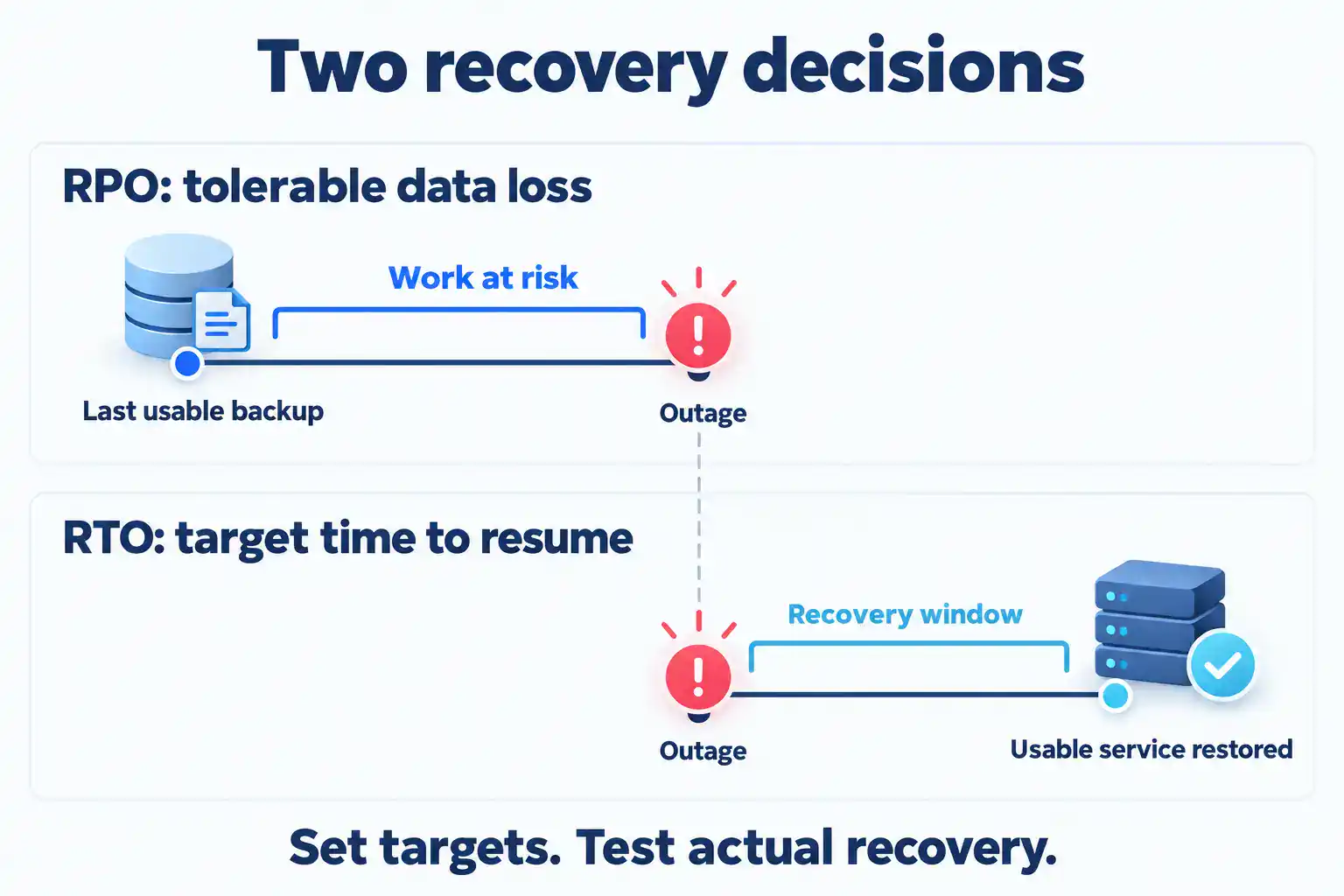
Imagine a business loses access at noon and its latest usable backup is from 10 a.m. Up to two hours of changes may need to be recreated. If staff can use the restored service at 3 p.m., the interruption lasted three hours. That example shows why the amount of work lost and the time spent waiting need separate targets.
Set objectives by activity. A current payroll workflow and an old marketing folder may have very different priorities. Consider busy periods, deadlines and dependencies rather than giving every system the same target. Our guide to estimating the business cost of IT downtime can help you decide which work needs to return first.
Then ask the IT team to explain what meeting those objectives would require. Faster recovery may need additional infrastructure, more frequent recovery points or an agreed temporary working arrangement. Make that trade-off explicit before choosing a solution.
3. Keep copies that can survive different failures
The familiar 3-2-1 backup rule means three copies in total, including the working copy, across two types of media, with one copy off site. Use it as a starting point, then check whether your copies are separated from the risks your business faces.
The useful question is whether a single incident could affect every copy. A second drive in the same room may help with some equipment failures, but it shares the room’s physical risks. An off-site copy addresses location risk; its access controls still need attention.
Scroll the table to see all columns.
| Approach | What it can contribute | What still needs checking |
|---|---|---|
| Local backup | A nearby recovery source | Shared building, hardware and administrator risks |
| Cloud backup | A recovery source away from the office | Account access, restore options, connection limits and costs |
| Offline copy | Separation from connected systems while disconnected | Rotation, secure storage and the age of the available copy |
| Immutable storage | Restrictions on changing or deleting protected data | Exact product settings, lock state, permissions and retention |
Offline and immutable are different protections. Offline describes disconnection. Immutability describes restrictions on modification or deletion. Neither label establishes a complete recovery plan.
Some products distinguish between turning on immutability and locking that protection against later changes. The details depend on the product and configuration. Ask what the selected configuration actually protects, who can change it and what happens when retention expires.
4. Protect access to the backups as well as the files
Backup security needs its own review. Identify who can read backup data, perform a restore, shorten retention or delete copies. Restrict those permissions to the people who need them, protect administrative access with appropriate authentication and avoid depending on a single person’s account.
Sensitive backup data also needs protection in storage and during transfer. Keep encryption keys and recovery credentials available through a controlled recovery process. A protected copy is of little use if the only way to unlock it disappears with the failed system.
When reviewing backup access, we recommend asking two questions: who should be prevented from opening the data, and who must still be able to recover it during an incident?
Backups do not undo information theft. They may provide a route to restore systems after ransomware, but an incident can also involve stolen data or compromised accounts. Recovery therefore belongs alongside security and incident-response planning, rather than replacing them.
5. Check what your cloud services can actually recover
Cloud storage, synchronization, retention and backup serve different purposes. A service being online does not tell you which older files, deleted items or application states your business can recover.
Synchronization keeps selected locations aligned, so a change or deletion can spread between them. Version history and recycle bins can help with certain mistakes, subject to the service’s settings and limits. Retention policies govern keeping or deleting content; their existence alone does not establish the restore process you need.
Microsoft 365 includes native recovery features, and Microsoft also offers a dedicated Backup product for selected SharePoint sites, OneDrive accounts and Exchange mailboxes. The right question is which protection is configured for your organization and whether its recovery options meet your needs.
For each important cloud service, ask:
- Which accounts, sites, mailboxes or records are protected, and which are excluded?
- How far back can we recover, and how closely spaced are the available recovery points?
- Can we restore a single item, or does the process restore a larger collection?
- Does restoration overwrite newer work or allow a separate recovery location?
- What access would we need if a normal administrator account were unavailable?
Do not assume that purchasing a cloud licence answers these questions. Confirm the selected product, configuration and procedure, then test the recovery scenario that matters to the business.
6. Agree on frequency, retention and failure ownership
Backup frequency is how often copies or recovery points are created. Retention is how long they remain available. More frequent backups can reduce the gap between recovery points, while longer retention may help when a missing or damaged file is discovered later.
Decide both deliberately. The right settings depend on how quickly information changes, how much work you could recreate, how long problems might remain unnoticed and the records your business must keep. Confirm contractual, privacy and recordkeeping requirements with the appropriate advisers instead of treating a generic backup period as a legal rule.
Also distinguish a configured schedule from a successful, usable recovery point. Jobs can fail, protected data can grow and a destination can become unavailable. Name the person responsible for reviewing failures, escalating unresolved issues and checking that protection has resumed.
When comparing proposals, ask for these decisions in writing. “Daily backup” leaves important gaps unless you also know what is included, how long copies are kept and who acts when a job fails.
7. Test recovery through to usable business work
We look at recovery in terms of usable work. A completed backup job is only one part of that picture. A useful restore test follows a selected recovery scenario far enough to establish that the recovered information can be used for its intended business task.
Arrange the test with your IT provider or responsible administrator. Use an isolated or otherwise approved test location so the exercise does not overwrite live work, send unintended messages or expose confidential data. Include the person who understands the application and can judge the result.
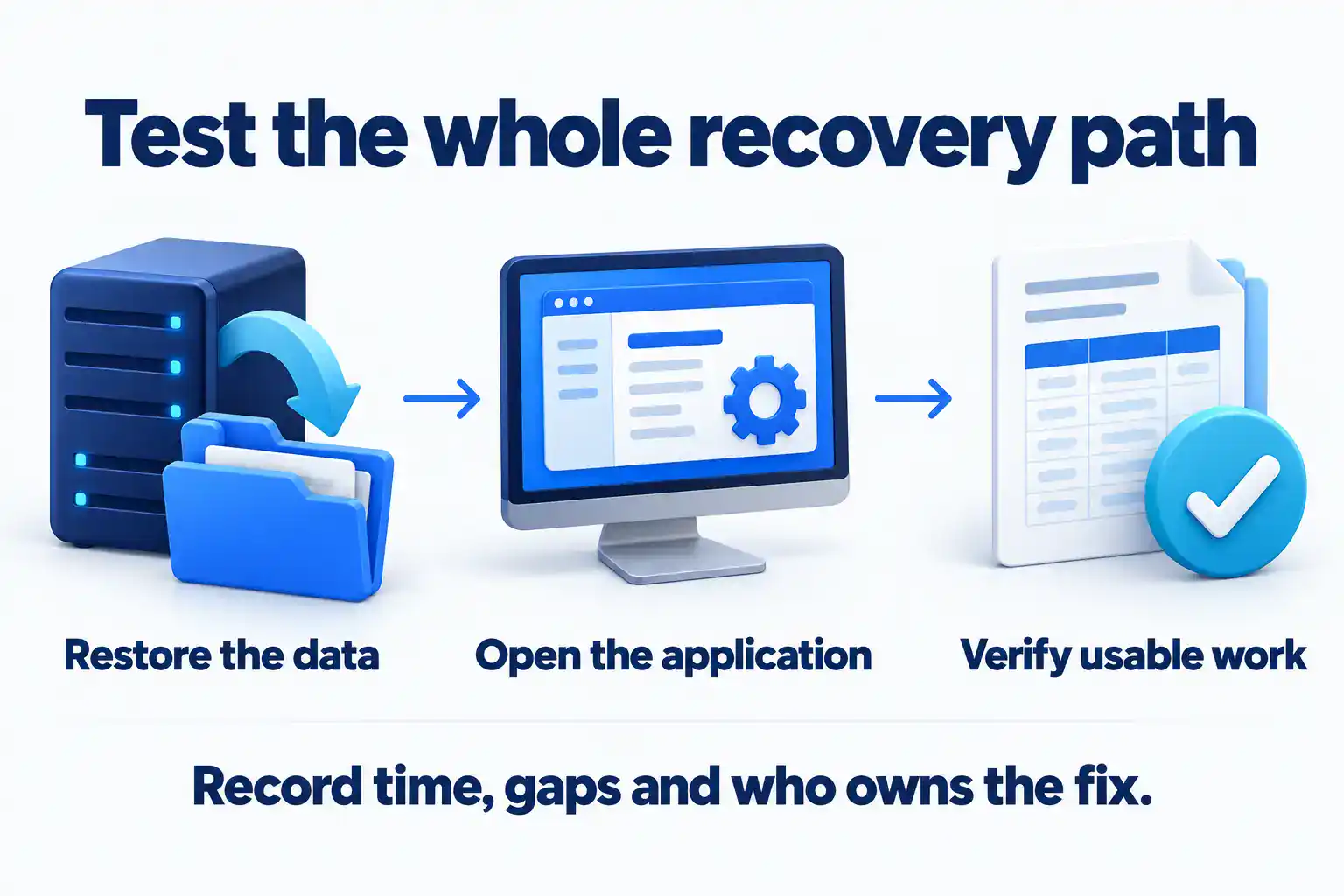
A practical backup restore-test checklist
- Choose the scenario. State what is assumed lost or unavailable: one file, an application, a server or access to the office.
- Identify the recovery point. Record its date, time and source. Compare its age with the business’s data-loss target.
- Confirm access and dependencies. Check credentials, keys, licences, software versions and the equipment or cloud resources needed.
- Restore in the agreed location. Record the steps and elapsed time, including any waiting or manual work.
- Validate the result. Open representative files or records in the required application. Check permissions and relevant business functions.
- Compare the result with the objective. Separate the file-transfer time from the time needed to make the service usable.
- Assign and retest fixes. Record missing coverage, access problems or unexpected dependencies, with an owner and follow-up date.
A sample file restore gives evidence about that sample. It does not demonstrate that every application or the whole office can recover. Combine appropriately scoped restore tests with broader recovery exercises that include dependencies and decision-making.
Ask for a short test record showing the scenario, recovery point, start and finish times, business checks and unresolved gaps. Agree who will clean up temporary test copies and confirm normal protection is still running. Set the next test date according to business risk and system change. Revisit it after an important migration, application change or change of provider.
What changes during a suspected cyber incident?
If data loss may involve an attacker, recovery needs to be coordinated with incident response. Restoring the latest copy immediately could bring back compromised material or reconnect a system before the cause of the incident has been addressed.
Use the agreed incident contact and escalation process. The response team should assess the affected environment, preserve relevant evidence, determine an appropriate recovery point and verify the recovery environment before returning systems to use. Follow your organization’s response plan rather than improvising destructive cleanup.
Keep a securely accessible copy of important recovery contacts and procedures outside the systems they describe. If business email is unavailable, the team still needs a way to reach the right people and authorize decisions.
Who can recover your data if your usual provider is unavailable?
Your recovery plan should not depend on one technician remembering how everything works. Agree who owns the backup account, who can authorize a restore and how an approved person can get the necessary access if your usual contact is unavailable. Keep those instructions secure and accessible during an outage.
If you change IT providers, include backup protection in the handover. Confirm which records, recovery procedures and access permissions need to transfer, and whether older recovery points will remain available. Agree who is responsible during the overlap. Check the replacement protection and a usable restore before retiring the old arrangement.
What should a backup proposal include?
We would compare two proposals against the same business requirements. Start with the protected systems, storage allowance, frequency and retention. Then ask what the fee covers: monitoring failed jobs, testing recovery, restoring data, replacement equipment and support outside normal hours. Where cloud recovery has transfer or usage charges, ask how those are estimated.
Ask where copies are stored, who can access them and whether the arrangement meets your contractual and privacy requirements. Get exclusions and separately quoted work in writing. A quick response to a support request and a fully restored application are different milestones; the proposal should make that distinction clear.
Use this worksheet for your next IT review
Bring these questions to the person responsible for each important system. “Unknown” is a useful finding when it leads to an assigned follow-up.
| Planning question | What to record |
|---|---|
| Which business activity depends on this system? | Activity, priority and business owner |
| What needs to be recovered? | Data, application, configuration and access dependencies |
| How much recent work could we recreate? | Agreed data-loss target |
| How long can the activity wait? | Agreed recovery-time target and temporary arrangements |
| What copies are available? | Scope, location, frequency, retention and access protections |
| What did the last relevant test show? | Scenario, recovery point, elapsed time and validation result |
| What remains unresolved? | Gap, responsible person and follow-up date |
| What does our agreement cover? | Monitoring, testing, recovery work, exclusions and possible extra costs |
The worksheet should make the next decision easier: improve coverage, change the recovery approach, fix an access dependency or test an assumption. Keep it current as the business changes.
Discuss backup as part of your ongoing IT plan
At Sytex, backup belongs within the wider conversation about managed IT services: the systems your business depends on, who looks after them and how support is coordinated.
If you are reviewing ongoing IT support for your Winnipeg business, explore our business data backup and recovery service. Bring your priority systems and any unanswered worksheet questions. The scope, recovery objectives and service arrangements should be agreed for your business.


